Effective and free online advertising methods for small businesses.
Effective and Free Online Advertising Methods for Small Businesses
Key takeaway
The most effective and free advertising for small businesses is not about being everywhere, it's about being visible where customers are already looking, then joining those channels together into one strategy.
Top 8 free/low-cost channels for SMEs:
- SEO –> Long-term, sustainable visibility in search. Requires patience but reduces reliance on paid ads over time.
- Google business profile –> The single most powerful tool for free local business advertising; keep it active and updated.
- Content marketing –> Answer real customer questions (guides, FAQs, comparisons) rather than writing sales copy.
- Email marketing –> One of the highest-ROI channels; nurtures existing contacts rather than chasing new eyes.
- Organic social media –> Best for reinforcing expertise and trust, not for reaching cold new audiences.
- Customer reviews –> Build trust at the decision stage and support local SEO.
- Referrals –> Ask happy customers directly; don't wait for them to volunteer.
- Industry directories –> Select quality over quantity (trade bodies, Chamber of Commerce, niche directories).
Common mistakes to avoid:
- Trying every channel at once instead of a focused strategy
- Treating SEO as a "one-off" project
- Chasing followers/engagement instead of enquiries
- Running channels in isolation instead of joined-up (e.g., one blog post feeding SEO, social, and email)
Free channels build long-term visibility; paid ads deliver immediate exposure. Most SMEs benefit from a blend. Paid for quick wins, organic for sustainability.
What are the most effective and free online advertising methods for small businesses?
For many UK SMEs, marketing budgets are under greater scrutiny than ever. Every pound spent needs to deliver measurable value, which often lead business owners and marketing managers to ask the same question:
"what are the most effective and free online advertising methods for small businesses?"
The good news is that "free" doesn't have to mean ineffective. Some of the highest-performing marketing channels require more time and expertise than financial investment, making them particularly valuable for growing businesses that wants sustainable results rather than short-term wins.
The challenge is not about finding free online marketing ideas for small businesses, as there are thousands online. The real challenge is identifying which activities will genuinely generate enquiries/ lead, support wider marketing strategy and continue to deliver value as the business grows.
Whether you operate as an SME in manufacturing, professional services, construction, retail or e-commerce, the principles remain the same.
Effective marketing is about reaching the right audience at the right moment with the right message.
It is not simply appearing on every platform available.
The most effective free online advertising methods for small businesses?
The most effective free online advertising methods for small businesses are those that help potential customers discover your business when they're actively researching a product or service. Instead of interrupting people with advertising, these methods position your business where customers are already looking.
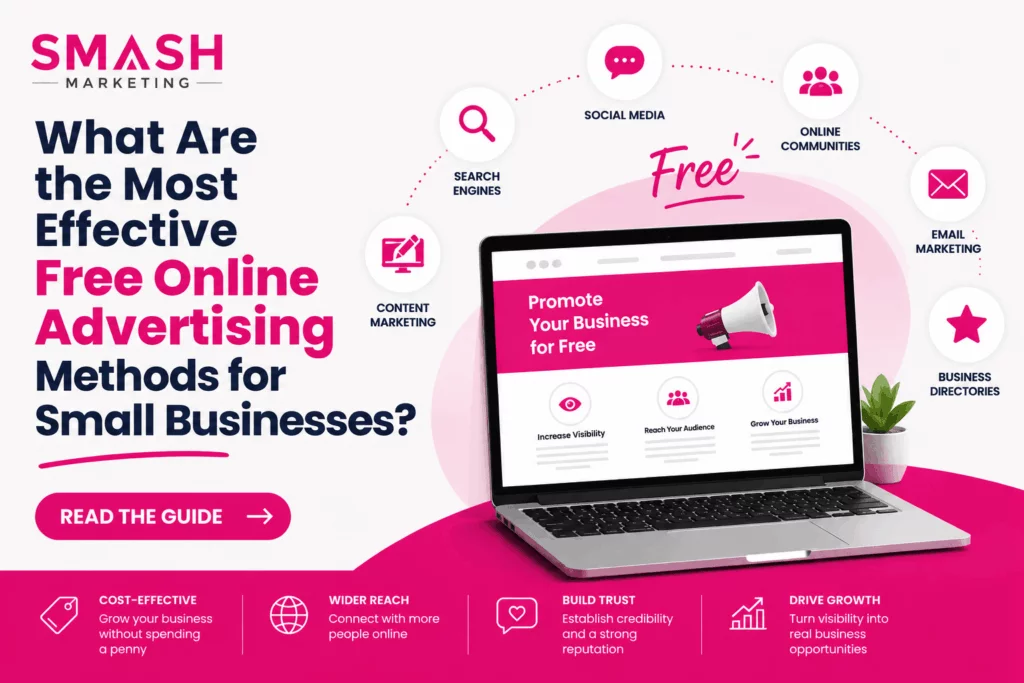
For most SMEs, the strongest channels include:
- Search Engine Optimisation (SEO)
- Google Business Profile
- Content marketing
- Email marketing
- Organic social media
- Customer reviews
- Industry directories
- Referral marketing
These channels perform different roles within your marketing strategy. For example, SEO attracts new visitors, email marketing nurtures existing contacts, while reviews and referrals help build trust at the point of decision.
Rather than treating them as separate activities, successful businesses combine them into a joined-up marketing strategy that supports long-term growth.
Why is SEO still one of the best free advertising methods for small businesses?
SEO remains one of the most valuable long-term marketing investments because it helps your business appear when prospects are actively searching for solutions. Unlike paid advertising, you are not paying for every website visitor.
Businesses often search for small business free advertising ideas, expecting quick wins. While SEO requires patience, it continues working long after content has been published, making it one of the few genuinely sustainable marketing channels.
For example, imagine a commercial accountant in Norfolk publishing detailed articles about capital allowances, tax planning and business growth. Those resources don't simply attract visitors, they answer questions that potential clients are already asking before they make contact.
Good SEO in 2026 is no longer about repeating keywords throughout a page. Search engines increasingly reward businesses that demonstrate genuine expertise and create content that helps users make informed decisions.
That means focusing on:
- Answering real customer questions
- Publishing expert insights rather than generic advice
- Creating pages that are easy to navigate
- Improving website speed and mobile usability
- Keeping content accurate and up to date
One of the biggest mistakes SMEs make is treating SEO as a one-off project. In reality, SEO is an ongoing process of improving your website, expanding your content and refining pages based on customer behaviour.
Businesses that consistently invest in SEO often find that their dependence on paid advertising gradually decreases over time.

How can Google Business Profile support free local business advertising?
If your business serves customers within a specific geographical area, your Google Business Profile is one of the most powerful forms of free local business advertising available.
When someone searches for services "near me" or within your local area, Google frequently displays map listings before traditional website results. Appearing there can significantly increase website visits, phone calls and enquiries without spending anything on advertising.
An effective profile should include:
- Accurate contact information
- Current opening hours
- High-quality photographs
- Clearly defined services
- Regular updates and posts
- Customer reviews
- Prompt responses to enquiries
Many businesses create their profile once and rarely update it. That's a missed opportunity.
Google increasingly favours businesses that maintain active profiles and regularly engage with customers. Simple actions such as uploading recent project photos or responding to reviews help demonstrate that your business is active, trustworthy and relevant.
For SMEs competing within regional markets, this can often produce faster results than investing heavily in paid campaigns.
Which small business advertising ideas deliver the best long-term value?
The most effective small business advertising ideas aren't necessarily the newest or the most fashionable. They're the ones that continue generating enquiries long after the initial work has been completed.
Content marketing is one of the best examples.
Rather than producing sales-focused articles, successful businesses create genuinely helpful resources that answer the questions prospects ask before making a purchase.
For example:
- An engineering company could explain how to choose the right manufacturing partner.
- A commercial cleaning business might publish office hygiene checklists.
- An e-commerce retailer could produce detailed product comparison guides.
- A financial adviser might explain changes to tax legislation affecting business owners.
This approach achieves several objectives simultaneously.
It supports SEO by creating valuable content for search engines.
It provides useful material to share on social media and in email campaigns.
Most importantly, it positions your business as a knowledgeable, trustworthy supplier before a sales conversation even begins.
One pattern we frequently see is businesses spending hours producing social media posts while neglecting the pages prospects actually read before making contact.
In many cases, improving those pages produces significantly more enquiries than publishing another month's worth of social content.
Is social media still worthwhile without paying for advertising?
Yes. But its role has changed considerably.
Organic social media is no longer the easiest way to reach completely new audiences. Instead, it is the most effective for reinforcing your expertise, maintaining visibility and building confidence among existing prospects.
Rather than asking, "What should we post today?", ask, "What questions are our customers asking this week?"
Content that performs consistently well includes:
- Customer success stories
- Behind-the-scenes insights
- Frequently asked questions
- Short educational videos
- Industry updates
- Team expertise
This type of content demonstrates credibility rather than simply filling a content calendar.
For SMEs, that's often a far better use of time than chasing viral trends that generate plenty of engagement but very few commercial enquiries.
Is Email Marketing One of the Effective and Free Online Advertising Methods for Small Businesses?
Yes, provided you're sending useful, relevant content rather than constant sales messages.
Many SMEs overlook email marketing because it doesn't feel as exciting as social media or paid advertising. In reality, it's often one of the highest-performing marketing channels because you're communicating with people who have already shown an interest in your business.
For growing businesses, email can support every stage of the customer journey.
You might use it to:
- Share helpful industry insights
- Promote new products or services
- Invite contacts to webinars or events
- Showcase case studies and customer success stories
- Keep existing customers informed
The businesses that see the strongest results don't email for the sake of it. They send content that helps customers solve problems, make decisions or stay informed.
Email marketing also complements SEO and content marketing. Every time you publish a useful article or guide, you create another reason to reconnect with your audience and bring them back to your website.
For SMEs with longer buying cycles, particularly in B2B sectors, that regular contact helps keep your business front of mind until prospects are ready to make a decision.

Are customer reviews and referrals really a form of free advertising?
Absolutely.
When prospective customers compare suppliers, they're often looking for reassurance rather than information. Reviews, testimonials and referrals provide that reassurance far more effectively than any sales message.
Encouraging customers to leave reviews on Google and relevant industry platforms is one of the simplest forms of free local business advertising, particularly for businesses serving a defined geographical area.
Reviews also support your wider SEO strategy by increasing trust and improving your visibility in local search results.
Don't be afraid of the occasional negative review either.
A thoughtful, professional response often creates a stronger impression than a page of perfect five-star ratings.
Likewise, referrals remain one of the most valuable sources of new business for SMEs.
Happy customers are usually willing to recommend you—they simply need to be asked at the right time.

Should SMEs still use online business directories?
Yes, but selectively.
Not every directory offers genuine value, and adding your business to hundreds of low-quality websites won't improve your marketing.
Instead, focus on trusted directories that your customers are genuinely likely to use.
Examples include:
- Industry-specific directories
- Professional associations
- Local business directories
- Chamber of Commerce listings
- Trusted review platforms
Accurate business information across these websites also helps search engines verify your business details, supporting local SEO and improving consistency across the web.
Combined with an optimised Google Business Profile, directories remain an effective part of a broader free online advertising methods for small businesses strategy.
What mistakes can stop free online marketing from generating enquiries?
One of the biggest misconceptions is that free online marketing produces free results. While these channels don't require large advertising budgets, they do require consistency, planning and ongoing improvement.
Some of the most common mistakes include:
- Trying to use every marketing channel at once
- Publishing content without understanding customer intent
- Focusing on followers rather than enquiries
- Ignoring website performance
- Failing to measure results
- Giving up before campaigns have had time to build momentum
Another common issue is treating each marketing activity in isolation.
SEO, email marketing, social media and content marketing shouldn't compete for attention. They should support one another.
For example, a single blog article can:
- Improve your organic search visibility
- Be shared across social media
- Form the basis of an email newsletter
- Answer sales enquiries before they're asked
- Strengthen your authority within your industry
That joined-up approach delivers significantly greater value than creating separate pieces of content for every channel.
When does paid advertising become the best advertising for small business?
When business owners ask about the best advertising for small business, they're often hoping for one perfect answer.
The reality is more nuanced.
Free online marketing channels build sustainable visibility over time, while paid advertising generates immediate exposure. For many SMEs, the strongest strategy combines both.
For example, a manufacturer launching a new service could use Google Ads to generate enquiries straight away while simultaneously investing in SEO content that builds long-term rankings.
Similarly, an ecommerce retailer might use paid social advertising to promote seasonal offers while email marketing encourages repeat purchases from existing customers.
The goal isn't choosing between free and paid marketing.
It's understanding when each channel contributes most effectively to your wider business objectives.
Businesses that rely entirely on paid advertising often see enquiries disappear the moment campaigns stop.
Businesses that invest only in organic marketing may struggle to generate short-term growth.
A balanced strategy provides both immediate opportunities and long-term resilience.
Should you manage your marketing internally or work with an agency?
That depends on your internal resources, expertise and commercial priorities.
Many SMEs have capable in-house marketing teams but limited capacity. Managing SEO, PPC, email marketing, social media, content creation and website optimisation simultaneously is a significant undertaking.
An experienced agency should never begin by recommending every available service.
Instead, it should start by understanding your commercial objectives before identifying the activities most likely to achieve them.
That's often where businesses see the greatest value.
Rather than delivering disconnected campaigns, an agency can ensure every marketing channel supports the same strategy, helping you generate better returns from the time and budget you're already investing.
It's an approach that agencies such as Smash Marketing adopt, focusing on practical, measurable marketing rather than unnecessary complexity.
Final thoughts
The most effective free online advertising methods for small businesses aren't hidden shortcuts or the latest marketing trend. They're proven activities that consistently help customers find your business, build trust and encourage meaningful action.
Whether you're researching small business advertising ideas, exploring small business free advertising ideas, looking for opportunities in free local business advertising, or deciding on the best advertising for small business, success comes from building a marketing strategy where every activity supports the next.
- SEO attracts potential customers through search.
- Content answers their questions.
- Social media reinforces your expertise.
- Email marketing keeps your business front of mind.
- Customer reviews provide reassurance.
- Your website converts interest into enquiries.
When these channels work together, your marketing becomes far more effective than any individual campaign.
If your current marketing feels reactive or disconnected, it may be time to step back and review how each activity contributes to your wider business goals. Whether that's something you manage internally or with the support of an experienced agency like Smash Marketing, a clear, integrated strategy is far more likely to deliver sustainable growth than chasing the latest trend or platform.
Frequently Asked Questions
The most effective methods include SEO, Google Business Profile, content marketing, email marketing, customer reviews, social media and referral marketing. Together, these channels help SMEs attract qualified traffic, build trust and generate enquiries without relying solely on paid advertising.Â
The best advertising for small business depends on your goals, audience and budget. Most SMEs benefit from combining long-term channels such as SEO and content marketing with targeted PPC campaigns when immediate results are required.Â
Some of the most effective small business advertising ideas include publishing helpful content, improving your Google Business Profile, collecting customer reviews, sending valuable email newsletters and creating educational social media content that answers customer questions.Â
Yes. Free local business advertising remains highly effective, particularly when your Google Business Profile is fully optimised, your business information is consistent across trusted directories and you're actively collecting customer reviews.Â
Some activities, such as improving your Google Business Profile or encouraging customer reviews, can generate enquiries relatively quickly. Others, including SEO and content marketing, often take several months to build momentum but usually provide stronger long-term returns.Â